

Latest Money-Saving Deals for Streamster
50% Off at Streamster


Deal Overview
Stream to multiple platforms simultaneously, expanding your audience effortlessly.
Diversify your content with versatile video sources, enhancing viewer engagement.
Control your live stream remotely and adjust settings on the go.
Stream with privacy and security through built-in VPN encryption.
Streamster: Your Ultimate Live Streaming Solution for Multidevice Broadcasting and Multistreaming
In the world of live streaming, making great content can be hard work. But Streamster is here to help you create and share your content easily and efficiently. Creating captivating live streams that engage your audience can be a daunting task, but Streamster simplifies the process for you. Streamster is your game-changer, making live streaming easy and super efficient, so you can enjoy a smooth and engaging broadcasting experience. With its advanced technology, Streamster simplifies live streaming for you.
Find out how Streamster can help you take your streams to the next level!
How Does It Work?
Streamster functions as your master conductor in the world of live streaming, expertly orchestrating your content delivery. Whether you’re setting up a multi-camera setup, configuring screen shares, or ensuring the lighting is perfect, Streamster ties everything together seamlessly. Once your stage is set, Streamster springs into action, connecting you to its servers for a broadcast that’s about to go global.
What truly sets Streamster apart is its unparalleled ability to dispatch your content across multiple platforms concurrently, as if you were simultaneously performing on stages around the world. Streamster’s servers deftly manage the technical complexities, ensuring that your audience experiences nothing less than smooth, high-quality viewing. Moreover, you have the creative freedom to customize your streams with overlays and dynamic zoom features, captivating and engaging your audience.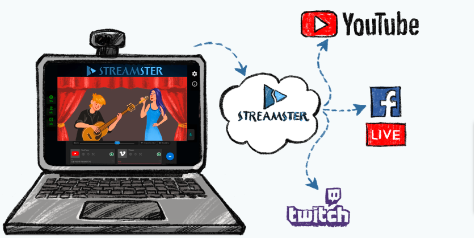
In essence, Streamster simplifies the intricate world of live streaming, making it accessible and efficient for everyone, without the usual headaches and complexities. Whether you’re a seasoned content creator or just starting your journey, Streamster offers the seamless experience you need to make your live streaming dreams a reality.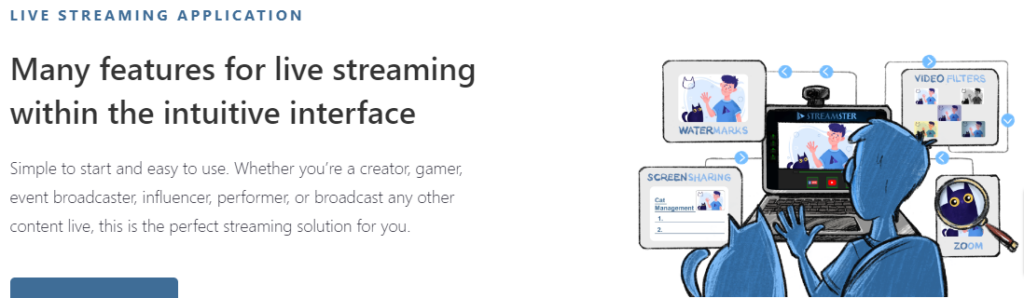
What are the Unique Features of Streamster?
Here are some features of Streamster:
- Seamless Multistreaming: Stream to various platforms simultaneously, expanding your reach and engaging with a broader audience effortlessly. Reach your followers wherever they are, without the hassle of managing multiple streams individually.
- Versatile Video Sources: Streamster allows you to diversify your content with ease. You can use webcams, capture screens, add image layers, or even stream directly from your web browser. The flexibility in video sources enables you to create captivating and unique streams.
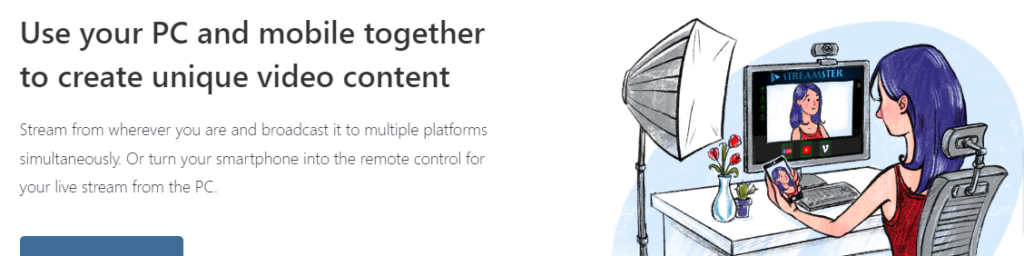
- Stream on Multiple Devices: Whether you’re streaming from a PC or a mobile device, Streamster has you covered. You can run the app on multiple devices simultaneously, allowing you to switch between sources on the fly and produce high-quality content from wherever you are.
- Responsive Design: Enjoy a responsive streaming experience by adjusting the application window size to your liking. Streamster’s responsive design ensures that you have full control over the visual elements of your live stream, guaranteeing the best viewing experience for your audience.
- Secure VPN Integration: Enhance your privacy and security during live streaming with Streamster’s built-in VPN feature. All your internet traffic is encrypted, safeguarding your data and protecting your online activities, even while streaming to blocked platforms.
- On-Server Transcoding: Customize your content for different platforms without overloading your system. Streamster’s on-server transcoding feature ensures that your streams meet different quality requirements, saving you valuable time and resources.
- Remote Control: Stream with ease and convenience by controlling your live stream from a remote PC or your Android/iOS mobile device. Adjust settings, switch sources, and monitor your stream on the go, providing a seamless broadcasting experience.
- Cloud Streaming Technology: Streamster takes care of the heavy lifting by handling video-splitting processes on its servers. This minimizes the load on your device, ensuring that your processor and internet usage remain consistent, even when broadcasting to multiple platforms.
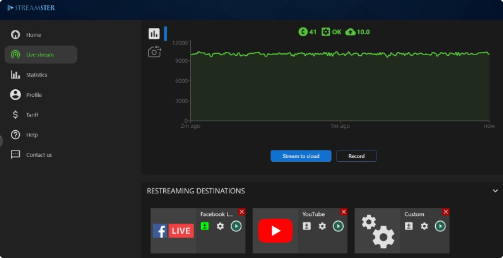
- High-Quality Viewing Experience: This platform cloud-based technology minimizes processor load and maintains consistent internet usage. This results in a smoother and high-quality viewing experience for your audience, increasing viewer satisfaction and engagement.
How to Use a Streamster?
- Download and Install Streamster: Begin your live streaming journey by downloading and installing the Streamster application on your preferred device, whether it’s a Windows PC, a mobile device, or even a GoPro camera.
- Set Up Your Streaming Scene: Launch the Streamster app and configure your streaming scene by selecting your preferred video sources, such as webcams, screen captures, or browser streaming, ensuring you’re ready to go wherever you are.
- Choose Your Streaming Platforms: Inside Streamster, create streaming channels tailored to the platforms you wish to stream on. Enter the necessary details for each platform to ensure a seamless connection, whether it’s from your PC, mobile device, or GoPro camera.
- Start Your Live Stream: With your scene and channels perfectly configured, you’re all set to kick off your live stream. Click the appropriate buttons to commence broadcasting your content to your selected platforms simultaneously. Whether you’re an adventurer using your GoPro or a creator streaming from your PC or mobile device, Streamster simplifies the live streaming experience for everyone.
- Sign up and save: Begin by signing up for Streamster and get an exclusive 50% discount with coupon code.
"Streamster has completely transformed my streaming experience. It's so user-friendly and efficient that I can now focus on creating content, not technical hassles." Adam Smith.


"I've tried other streaming platforms, but Streamster's multi-platform streaming and customization options make it my top choice." Richa.
"Streamster has given my gaming streams a professional edge. The ease of use and high-quality delivery keep my viewers engaged." Jhon mraker.
You May Also Be Interested In...

Afforai 60% Off at Afforai
Your all-in-one AI research assistant for efficient, multilingual, and customized insights
MD60Use This Coupon
illusto 15% Off at illutso
Transforming ideas into visual stories with ease
MD15Use This Coupon
Skillshare 30% Off at Skillshare
Unlock your creativity through a multitude of hands-on courses
0AFFUse This Coupon
 Your information is safe with us — we will never spam you or sell your information